You can remove any design element from your canvas.
- Select the item you wish to delete from the design
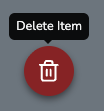
- Click on the red trash can icon that appears in the bottom left corner of the canvas. Alternatively, press the "delete" (DEL) button on your computer keyboard.
- The selected item will be deleted from the canvas.
Accidentally deleted something? Use the undo button in the bottom left corner of the canvas or press Ctrl+Z (Cmd+Z on Mac) to restore it.
Was this article helpful?
That’s Great!
Thank you for your feedback
Sorry! We couldn't be helpful
Thank you for your feedback
Feedback sent
We appreciate your effort and will try to fix the article