How do I start a design from a template?
Skip the blank canvas with landscape design templates. Browse professionally designed layouts by region and style, then customize plants and objects to make it yours.
Templates are professionally designed landscapes that you can use as a starting point or inspiration for your own design. They're perfect when you want guidance or need ideas.
To start from a template:
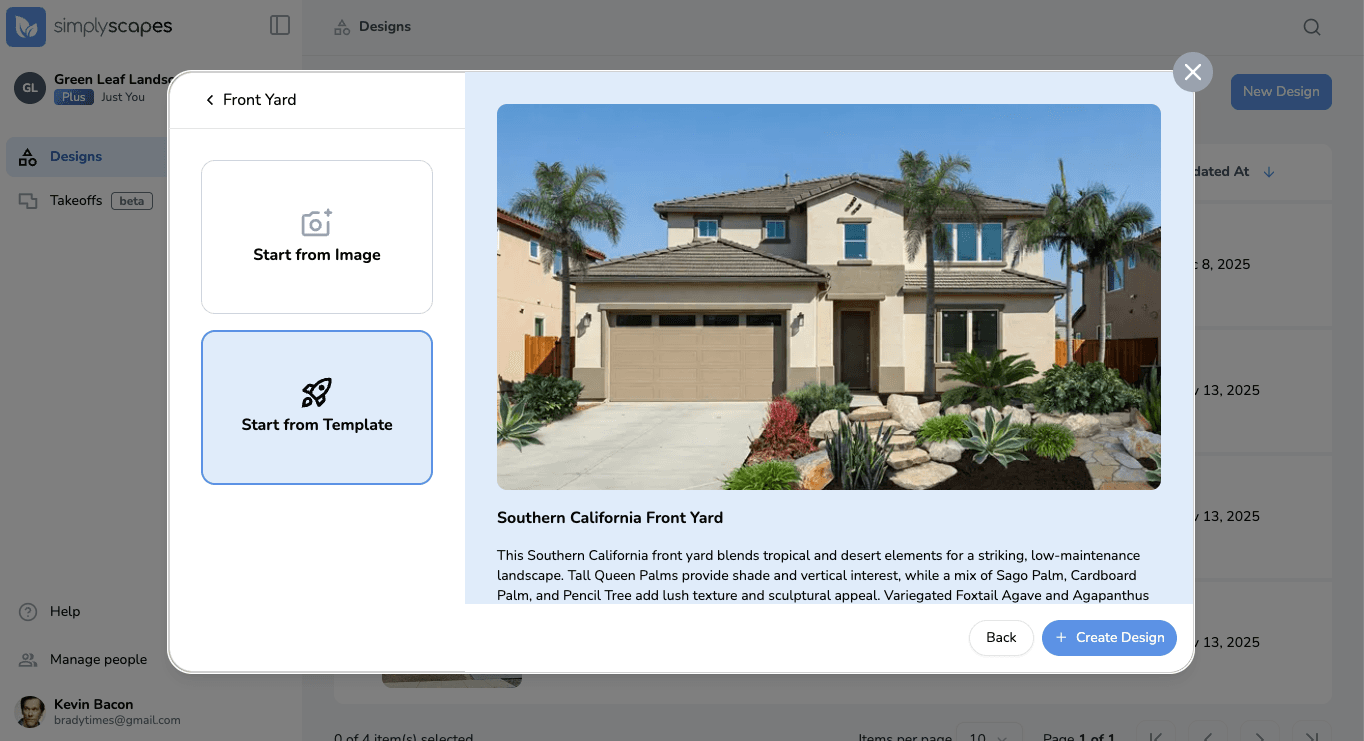
- From your dashboard, click "Create Design"
- Select the design area (Front Yard, Backyard, etc.)
- Click "Start from Template"
- Browse the available templates - SimplyScapes offers curated design templates for different regions and styles
- Click a template to view its details and plant list
- Click "Create Design" to start with that template
The Visual Designer will open with the template design, which you can customize by:
- Swapping out plants
- Moving or resizing elements
- Adding or removing objects
- Changing the background image
How do I start a design from an image?
Turn a photo of your yard into a landscape design. Upload a property image, open it in the Visual Designer, and start adding plants and objects in a few steps.
What makes a good background image for my design?
Get realistic results with the right property photo. Tips on lighting, camera angle, resolution, and file format for the best background image in your landscape design.