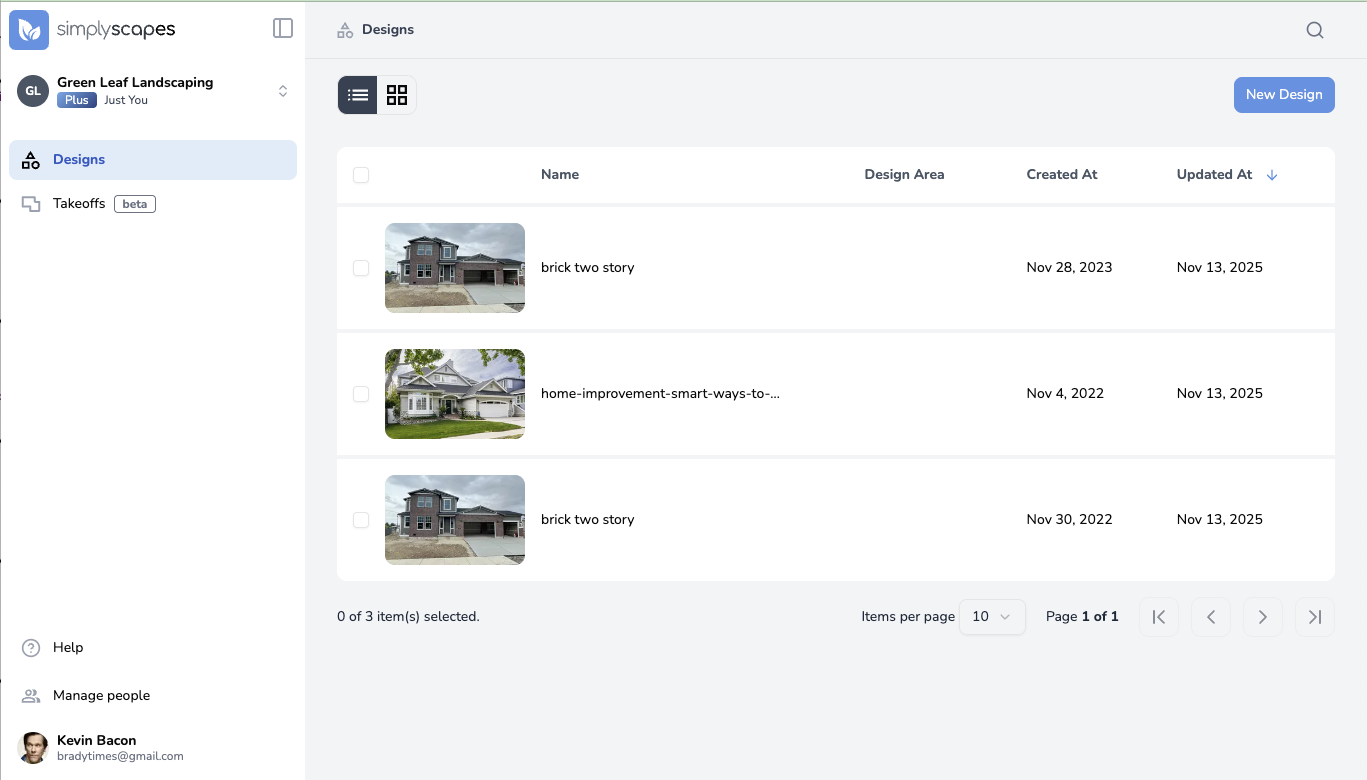
The SimplyScapes dashboard is designed to be intuitive and easy to use. Here's what you'll find and how to use it:
Top Bar
- Visual Designer / Aerial Designer tabs - Toggle between design types
- Search icon (top right) - Search across your designs
- Create Design button (top right) - Start a new Visual Design
Left Navigation Panel
Shows different sections depending on your workspace type:
- Workspace Selector (top left) - Switch between workspaces or access workspace settings
- Designs - All workspaces
- Takeoffs - Professional workspaces only (Beta)
- More sections coming soon for Professional workspaces
Main Content Area
Displays your designs in either:
- Thumbnail view - Visual cards showing design previews
- List view - Table format with sortable columns
View Controls
- View toggle (upper left of content area) - Switch between thumbnail and list views
- Sort dropdown - Order designs by Last Modified, Name, or Date Create
Navigation tips:
- Click any design thumbnail or row to open and edit it
- Use the search bar to quickly find specific designs
- Hover over design thumbnails to see additional options (three dots menu)
Was this article helpful?
That’s Great!
Thank you for your feedback
Sorry! We couldn't be helpful
Thank you for your feedback
Feedback sent
We appreciate your effort and will try to fix the article