What is a workspace in SimplyScapes?
A workspace is your hub for Jobs, Visual Designs, Site Plans, settings, billing, and Professional client or team records.
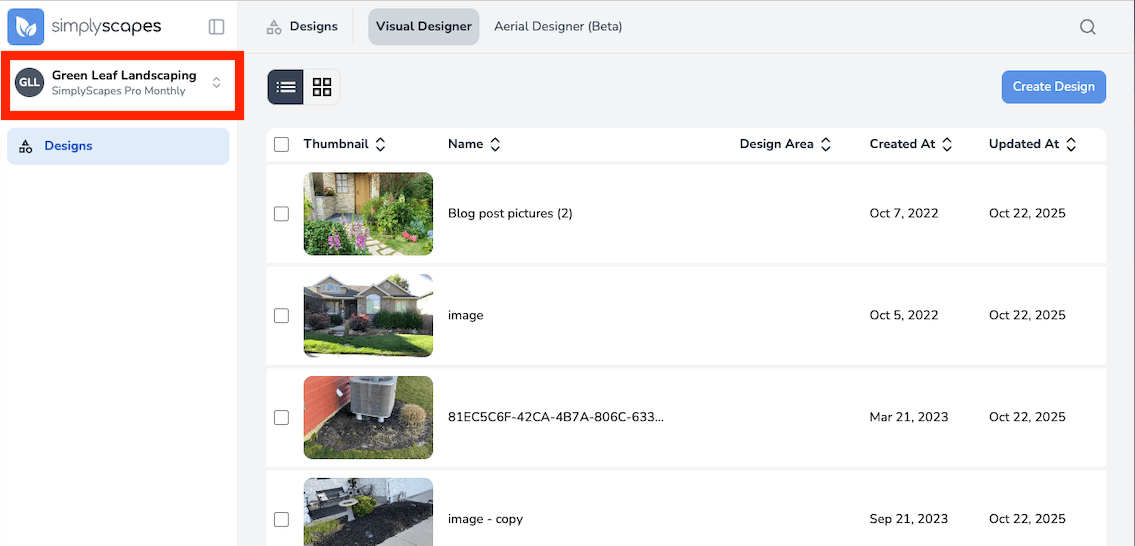
A workspace keeps a set of landscape projects, settings, and billing together. If you belong to more than one workspace, switching workspaces changes the Jobs, designs, and records you see.
Homeowner workspaces
Homeowner workspaces are for someone planning their own property. The default name is Personal Workspace, and you can rename it. They are intended for one person.
Professional workspaces
Professional workspaces represent a company or organization. They add client records, a standalone Site Plans list, a business profile connection, and team access through the Manage people area.
What a workspace includes
- Jobs, including their details, activity, designs, Site Plan, estimate documents, plant list, and Build tasks.
- Visual Designs and custom images.
- Site Plans connected to jobs.
- Workspace settings and billing.
- Client records and a standalone Site Plans list in Professional workspaces.
- Members and roles in Professional workspaces.
SimplyScapes Labs
Home/Jobs and Manage people appear after a workspace administrator enables Labs. Within Jobs, Estimate, Build, and panels carrying a Labs badge are still being developed.
Each workspace keeps its own data and subscription. Work in one workspace does not affect another.
Workspaces
Organize your landscape designs and team in SimplyScapes workspaces. Learn to create, configure, switch, and manage Homeowner and Professional workspaces.
How do I create my workspace?
Create your first SimplyScapes workspace with the setup wizard. Choose a Professional or Homeowner type, name it, and start designing in a few quick steps.