How do I create and log in to my SimplyScapes account?
Create a free SimplyScapes account in seconds with no password. Sign in using an emailed one-time passcode or Continue with Google to start designing.
You can set up a SimplyScapes account in two ways: with your email address, or with Google. Either way, if you already have an account, we'll simply log you in.
SimplyScapes doesn't use passwords. There's nothing to create, remember, or reset. You sign in one of two ways:
- A one-time passcode (OTP) we email you, or
- Sign in with Google, using your existing Google Account.
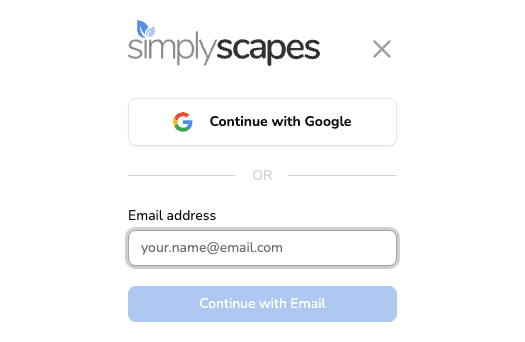
Getting to the sign-in screen
There's no separate "Log In" link, because signing up and logging in are the same thing. From simplyscapes.com, select Get Started Free in the top right. If you've signed in on this device before, that button reads Go to Dashboard instead — it goes to the same place. You can also go straight to app.simplyscapes.com.
Sign in with an emailed passcode
- Go to simplyscapes.com and select Get Started Free in the top right.
- Enter your email in the Email address field and select Continue with Email.
- Check your inbox for a 6-digit passcode from SimplyScapes.
- Enter the passcode on screen and select Verify code.
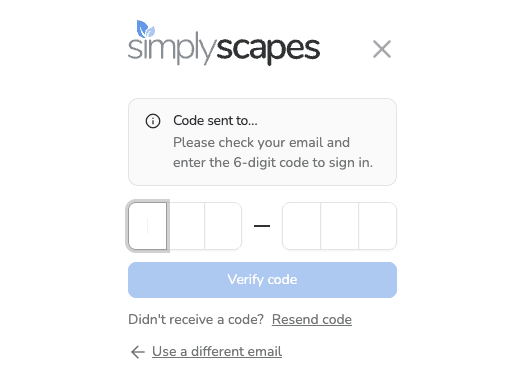
That's it, you're in. New accounts are guided to set up their first workspace.
The passcode expires after 5 minutes. If it expires, select Resend code for a new one. You can request up to 3 codes within a 15-minute window. Entered the wrong email? Select Use a different email to start over.
Can't find the email? Check your spam folder, or search your inbox for "SimplyScapes."
Sign in with Google
If you have a Google Account (the account you use for Gmail and other Google services), you can use it to sign in. You never share your Google password with SimplyScapes. Google handles the sign-in and confirms your identity for you.
- Go to simplyscapes.com and select Get Started Free in the top right.
- Select Continue with Google.
- Choose your Google Account and confirm. Google signs you in and brings you back to SimplyScapes.
Signing up and logging in are the same
SimplyScapes doesn't have separate sign-up and login flows. Enter your email, or use Continue with Google. If you already have an account, you're logged in. If you don't, one is created for you.
Account Management
Manage your SimplyScapes account. Create an account, log in passwordless with a one-time code, update your profile, change your email, or delete your data.
Do I need a password?
SimplyScapes uses passwordless login, so there is no password to set, remember, or reset. Sign in with a 6-digit code emailed to your inbox instead.