How do I delete my account or my personal data?
Permanently delete your SimplyScapes account and personal data from settings. See what gets removed, why it cannot be undone, and how to handle GDPR requests.
SimplyScapes respects your privacy and will never share your information without your consent. You can permanently delete your account, and with it your personal data, at any time right from your settings. This is the same thing as a "delete my data" or "right to be forgotten" request, so there's no separate form to fill out.
Before you start, please note that this action is permanent and cannot be undone.
Need help instead? Consider contacting our support team before deleting your account. We may be able to resolve whatever issue you're running into, and if you have a subscription you'll usually want to cancel it first so you aren't charged again.
Delete your account
- Navigate to My Settings (click your profile icon, then My Settings)
- Scroll down to the "Danger Zone" section at the bottom of the page
- Click "Delete Account"
- Review the confirmation message explaining what will be deleted
- Confirm the deletion in the confirmation window

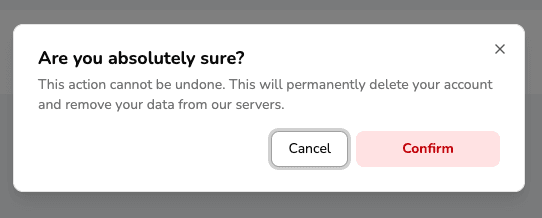
You'll be signed out and sent back to the sign-in screen once deletion finishes.
What gets removed
Deleting your account removes your personal data across SimplyScapes and the outside services we rely on, as far as we're able to reach it:
- Your profile and account details (your name, email, and login)
- All of your designs
- Your workspace data (removed when you're the last member of a workspace)
- Your contact record in our email and support systems
Because everything above is tied together, we can't delete "just the data" while keeping the login working. Deleting the account is how the data comes out. You won't be able to recover any of it afterward.
"Delete my personal data" (GDPR and similar requests)
If your goal is to have SimplyScapes erase the personal information we hold about you, deleting your account (the steps above) is the way to do it. It removes your personal data from our systems and from the outside services we use, so there's nothing extra you need to request.
If you can't reach the Danger Zone (for example, you've lost access to the email on the account, or you're not sure which account holds your data), email us at support@simplyscapes.com from the address you signed up with and we'll take care of the request for you. See Regaining access to your account if the trouble is getting logged in.
Before you delete: save anything you want to keep
Deletion is permanent, so grab copies of anything you'd like to hold onto first:
- Open any design you want to keep and export it (for example, as a PDF or image) before you delete
- If you have a subscription, cancel it so it doesn't renew
Regaining access to your account
Locked out of SimplyScapes? Recover access when you lose your email, find your designs across duplicate accounts, or transfer the account to a new owner.
Workspaces
Organize your landscape designs and team in SimplyScapes workspaces. Learn to create, configure, switch, and manage Homeowner and Professional workspaces.